Showing posts with label issues. Show all posts

Monday, 7 September 2015

ERROR: The provided repository type was not detected in the current directory.

When creating diff using 'rbt post' for review board with perforce client, reported issue occurs as below. This can be solved by verifying the client root in p4client and the path from where the rbt post command issued must be the same.


C:\Users\demouser>rbt post -d --repository-type perforce

>>> RBTools 0.7.4

>>> Python 2.7.6 (default, Nov 10 2013, 19:24:18) [MSC v.1500 32 bit (Intel)]

>>> Running on Windows-7-6.-SP1

>>> Home = C:\Users\demouser\AppData\Roaming

>>> Current directory = C:\Users\demouser

>>> Checking for a Perforce repository...

>>> Running: p4 info

ERROR: The provided repository type was not detected in the current directory.


 C:\Users\demouser>


Client root in p4 client should be the same as current directory

Saturday, 11 July 2015

object doesn't support this property or method attachevent


  • When I try to launch the Internet Explorer 11 via Selenium RC server, faced with the below pop.
  • After surfing found attachEvent is a deprecated function used in older versions of Internet Explorer and modern browsers use addEventListener instead.
  • So if you are using earlier version of Selenium server try using the latest selenium standalone server. Which will solve the reported pop up issue.


couldn't open app window; is the pop-up blocker enabled

When I try to launch the Internet Explorer 11 via Selenium RC server, faced with the below pop.

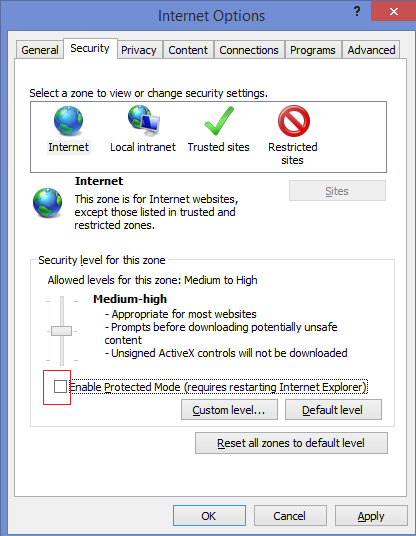
After marking the pop up blocking to be turned off and disabling the “Enable protected mode settings” under security tab, the reported issues got resolved. Please find the helpful screen shots.


Saturday, 16 May 2015

Unexpected error in launching a slave. This is probably a bug in Jenkins

Launching a slave agent in Jenkins could result in the below error. This occurs when adding a Linux machine as slave node in Jenkins. Here ssh connection to the Linux server fails.

[05/17/15 00:53:52] [SSH] Opening SSH connection to 192.168.212.18:22.

Permission denied: connect
ERROR: Unexpected error in launching a slave. This is probably a bug in Jenkins.
java.lang.IllegalStateException: Connection is not established!
    at com.trilead.ssh2.Connection.getRemainingAuthMethods(Connection.java:1030)
    at com.cloudbees.jenkins.plugins.sshcredentials.impl.TrileadSSHPasswordAuthenticator.canAuthenticate(TrileadSSHPasswordAuthenticator.java:82)
    at com.cloudbees.jenkins.plugins.sshcredentials.SSHAuthenticator.newInstance(SSHAuthenticator.java:207)
    at com.cloudbees.jenkins.plugins.sshcredentials.SSHAuthenticator.newInstance(SSHAuthenticator.java:169)
    at hudson.plugins.sshslaves.SSHLauncher.openConnection(SSHLauncher.java:1173)
    at hudson.plugins.sshslaves.SSHLauncher$2.call(SSHLauncher.java:701)
    at hudson.plugins.sshslaves.SSHLauncher$2.call(SSHLauncher.java:696)
    at java.util.concurrent.FutureTask.run(Unknown Source)
    at java.util.concurrent.ThreadPoolExecutor.runWorker(Unknown Source)
    at java.util.concurrent.ThreadPoolExecutor$Worker.run(Unknown Source)
    at java.lang.Thread.run(Unknown Source)
[05/17/15 00:53:53] Launch failed - cleaning up connection
[05/17/15 00:53:53] [SSH] Connection closed.


One instance where this could be corrected is to enable the publickey authentication in the linux server.

Few steps to do so are as below,


  • Edit the sshd_config file under /etc/ssh to modify the parameters, here we enable the publickey authentication and authorisedKeys.


  • After modifying the file to take effect restart sshd service


  • Then relaunch the slave agent which should be successful.


Saturday, 27 December 2014

Password field value entered twice on using selenium webdriver

While running webdriver script to login to webpage by provide the username and password credentials, you may notice that the password field is actually entered twice once you enter the username and then entering the password.

The reason is when you have logged in before via manually/script and if the auto save feature of user name and passwords are enabled and saved this may occur.

If Auto save feature is enabled for username and password, after entering the username via script and tabbing out to enter the password itself put the saved password.

Here the password is 7 characters, but 14 characters has been updated.

Password typed twice


Solution:

1. Remove the auto save of user name and password feature at browser level
2. Or do a clear on the fields before entering the values.
 

Thursday, 25 December 2014

The method sendKeys(CharSequence[]) in the type WebElement is not applicable for the arguments (String)

When using sendKeys on an web element using selenium, the reported exception may be thrown as below.

Exception in thread "main" java.lang.Error: Unresolved compilation problem:
    The method sendKeys(CharSequence[]) in the type WebElement is not applicable for the arguments (String)

    at scripts.VerifyLogin.main(VerifyLogin.java:12)


This can be corrected by changing the java compilation level tot he latest availabe verison in eclipse.
Project propeties > Build Path > configure Build Path > Java compiler > compiler compilation level (Change to latest available version).


Friday, 24 October 2014

Oracle tables starts with BIN$


DROP table puts the tables in recycle bin, and it can be removed from recycle bin by using PURGE command.
The tables in recycle bin can be viewed by 'show recyclebin';

SQL> DROP TABLE RECYCLE;
Table dropped.
SQL> show recyclebin;
ORIGINAL NAME    RECYCLEBIN NAME                OBJECT TYPE  DROP TIME
---------------- ------------------------------ ------------ -------------------
RECYCLE          BIN$FGO4f+kYTnW0fc0rTXSvHQ==$0 TABLE        2014-09-12:19:11:48
SQL>
SQL> PURGE TABLE RECYCLE
  2  ;
Table purged.
SQL> show recyclebin;
SQL>

Detailed description can be found here

http://docs.oracle.com/cd/B19306_01/server.102/b14231/tables.htm#ADMIN01511

Thursday, 9 October 2014

org.openqa.selenium.remote.SessionNotFoundException: Unexpected error launching Internet Explorer. Protected Mode settings are not the same for all zones. Enable Protected Mode must be set to the same value (enabled or disabled) for all zones. (WARNING: The server did not provide any stacktrace information)


[TestNG] Running:
  C:\Users\tester\AppData\Local\Temp\testng-eclipse-520368244\testng-customsuite.xml

Started InternetExplorerDriver server (32-bit)
2.42.0.0
Listening on port 30903
FAILED CONFIGURATION: @BeforeMethod beforeMethod
org.openqa.selenium.remote.SessionNotFoundException: Unexpected error launching Internet Explorer. Protected Mode settings are not the same for all zones. Enable Protected Mode must be set to the same value (enabled or disabled) for all zones. (WARNING: The server did not provide any stacktrace information)
Command duration or timeout: 1.69 seconds
Build info: version: '2.43.1', revision: '5163bce', time: '2014-06-10 19:27:58'


Driver info: org.openqa.selenium.ie.InternetExplorerDriver
 at sun.reflect.NativeConstructorAccessorImpl.newInstance0(Native Method)
 at sun.reflect.NativeConstructorAccessorImpl.newInstance(Unknown Source)
 at sun.reflect.DelegatingConstructorAccessorImpl.newInstance(Unknown Source)

.
.
.

The protected mode setting in internet explorer must be enabled for all zones listed under the security tab on Internet Options menu.
Correcting it to have the setting enables would solve the above reported issue.


Tuesday, 7 October 2014

ORA-01119: error in creating database file


After dropping tablespace with including contents, may end up with "ORA-01119: error in creating database file".

Reasons could be
1. Not deleting the datafile with "INCLUDING CONTENTS AND DATAFILES"
2. Provided directory path does not exist
3. Error accessing the directory (read/write permission or misspelling of directory names)
4. Datafile already existing in the current directory


Here is the case with not deleting datafile with drop tablespace,

SQL> DROP TABLESPACE DATATS INCLUDING CONTENTS;
Tablespace dropped.


SQL> CREATE TABLESPACE DATATS LOGGING DATAFILE '/home/database/DATATS1.dbf' SIZE 1G AUTOEXTEND ON NEXT 50M MAXSIZE UNLIMITED EXTENT MANAGEMENT LOCAL SEGMENT SPACE MANAGEMENT AUTO
*
ERROR at line 1:
ORA-01119: error in creating database file
'/home/database/DATATS1.dbf'
ORA-27038: created file already exists
Additional information: 1


SQL> DROP TABLESPACE DATATS INCLUDING CONTENTS and datafiles;
DROP TABLESPACE DATATS INCLUDING CONTENTS and datafiles
*
ERROR at line 1:
ORA-00959: tablespace 'DATATS' does not exist


$ ls -lrt
total 63169492
-rw-r----- 1 oracle dbs   359723476 Oct  6 16:59 DATATS1.dbf
-rw-r----- 1 oracle dbs   863962592 Oct  6 23:03 temp01.dbf
-rw-r----- 1 oracle dbs   831239922 Oct  7 10:24 system01.dbf
-rw-r----- 1 oracle dbs   513430411 Oct  7 10:24 sysaux01.dbf
-rw-r----- 1 oracle dbs   108758112 Oct  7 10:24 redo03a.log
-rw-r----- 1 oracle dbs   104858342 Oct  7 10:24 redo02a.log
-rw-r----- 1 oracle dbs   222677423 Oct  7 10:24 INDEXTS1.dbf
.
.
.


$ rm -r DATATS1.dbf

SQL> CREATE TABLESPACE DATATS LOGGING DATAFILE '/home/database/DATATS1.dbf' SIZE 1G AUTOEXTEND ON NEXT 50M MAXSIZE UNLIMITED EXTENT MANAGEMENT LOCAL SEGMENT SPACE MANAGEMENT AUTO;
Tablespace created.

Monday, 1 September 2014

Exception in thread "main" java.lang.IllegalStateException

When executing a selenium script written in java to use IE/Chrome driver, an exception would have been thrown to check System.setProperty. The code below seems to be exactly right but 'webdriver' is coded as 'Webdriver' in the first argument, and there stands the exception.

File file = new File("G:\\Data\\git\\Test\\lib\\IEDriverServer.exe");
System.setProperty("Webdriver.ie.driver", file.getAbsolutePath());
WebDriver driver = new InternetExplorerDriver();


Exception in thread "main" java.lang.IllegalStateException: The path to the driver executable must be set by the webdriver.ie.driver system property; for more information, see http://code.google.com/p/selenium/wiki/InternetExplorerDriver. The latest version can be downloaded from http://selenium-release.storage.googleapis.com/index.html

Monday, 5 May 2014

Exception in thread "main" org.openqa.selenium.WebDriverException: f.QueryInterface is not a function

While running java class file for selenium webdriver facing with the issue as below:

Exception in thread "main" org.openqa.selenium.WebDriverException: f.QueryInterface is not a function
Command duration or timeout: 30 milliseconds
Build info: version: '2.41.0', revision: '3192d8a', time: '2014-03-27 17:18:15'
System info: host: 'rgfr12321', ip: '104.43.244.18', os.name: 'Windows 7', os.arch: 'x86', os.version: '6.1', java.version: '1.7.0_45'
Session ID: 7afc8ea4-c911-4da7-a435-5f34622ca096
Driver info: org.openqa.selenium.firefox.FirefoxDriver
Capabilities [{platform=XP, acceptSslCerts=true, javascriptEnabled=true, cssSelectorsEnabled=true, databaseEnabled=true, browserName=firefox, handlesAlerts=true, browserConnectionEnabled=true, webStorageEnabled=true, nativeEvents=true, rotatable=false, locationContextEnabled=true, applicationCacheEnabled=true, takesScreenshot=true, version=28.0}]
 at sun.reflect.NativeConstructorAccessorImpl.newInstance0(Native Method)
 at sun.reflect.NativeConstructorAccessorImpl.newInstance(Unknown Source)
 at sun.reflect.DelegatingConstructorAccessorImpl.newInstance(Unknown Source)
 at java.lang.reflect.Constructor.newInstance(Unknown Source)
 at org.openqa.selenium.remote.ErrorHandler.createThrowable(ErrorHandler.java:193)
 at org.openqa.selenium.remote.ErrorHandler.throwIfResponseFailed(ErrorHandler.java:145)
 at org.openqa.selenium.remote.RemoteWebDriver.execute(RemoteWebDriver.java:595)
 at org.openqa.selenium.remote.RemoteWebDriver.get(RemoteWebDriver.java:300)
 at sample.Gmail.main(Gmail.java:14)
Caused by: org.openqa.selenium.remote.ErrorHandler$UnknownServerException: f.QueryInterface is not a function
Build info: version: '2.41.0', revision: '3192d8a', time: '2014-03-27 17:18:15'
System info: host: 'rgfr12321', ip: '104.43.244.18', os.name: 'Windows 7', os.arch: 'x86', os.version: '6.1', java.version: '1.7.0_45'
Driver info: driver.version: unknown


This can be corrected by having the pull path of the url as below


Change:
WebDriver driver = new FirefoxDriver();
driver.get("www.gmail.com");

To:
WebDriver driver = new FirefoxDriver();
driver.get("http://www.gmail.com");

Saturday, 29 March 2014

Insert string with apostrophe(') in sql

when using Insert statement to inset string type fields and the values has an apostrophe('), how

the inset statements can be handled in such cases.


SQL> insert into donuts values('jelly's,9);
insert into donuts values('jelly's,9)
                                   *
ERROR at line 1:
ORA-00917: missing comma


SQL> insert into donuts values('jelly''s,9);
ERROR:
ORA-01756: quoted string not properly terminated

The Error displayed here is due to string data types that are delimited by the single quotation mark and the apostrophe(') is considered as the end of the string  delimiter.

The possible way is to escape single apostrophe (') with an extra apostrophe as below.


SQL> insert into donuts values('jelly''s',9);

1 row created.

Now the string with apostrophe is inserted into the table.

SQL> select * from donuts;


NAME PRICE
---------- ----------
jelly 9
jell's 9


Saturday, 22 March 2014

Exception in thread "main" java.lang.AssertionError: Subclass must override this method


Exception in thread "main" java.lang.AssertionError: Subclass must override this method

   at java.lang.reflect.AccessibleObject.getAnnotation(libgcj.so.7rh)

   at org.kohsuke.args4j.ClassParser.parse(ClassParser.java:21)
   at org.kohsuke.args4j.CmdLineParser.<init>(CmdLineParser.java:91)
   at hudson.remoting.Launcher.main(Launcher.java:170)
To overcome this on launching slave.jar as part of jekins setup, try using latest java version.
This should be solved on using the latest java versions.